
For SEO Workflows, Comfy UI beats the usual User Interface for repeatable content output at scale. Traditional tools still lead for audits, research, and diagnostics. That gap makes SEO Workflows hard to judge. We have tested node-based production setups and standard SEO stacks, so this comparison shows where each fits, where SEO Workflows break, and how to combine both with less waste.
ComfyUI vs Traditional SEO Interfaces: Side-by-Side Comparison
| ComfyUI (Node-Based Interface) | Traditional SEO Tool Interfaces | |
|---|---|---|
| Learning Curve | Steep initial (4–12 hrs); moderate once node logic is understood | Low to moderate – pre-built dashboards, familiar UI patterns |
| Workflow Repeatability | Excellent – workflows export as JSON, version-controllable, shareable via templates | Moderate – reports are standardised; custom flows require platform-specific configuration |
| Batch Processing & Scale | Native batch queue; unlimited variations via seed stepping and parameter randomization | Via plan limits and operation caps; costs escalate with volume (thousands of ops per run) |
| Integration with SEO Stack | API nodes, cloud endpoints, Make/n8n webhooks; no native GSC/Ahrefs connectors | Deep – native GSC, GA4, Ahrefs, Screaming Frog connectors; 400+ pre-built integrations |
| Output Control & Consistency | Granular – every parameter inspectable; LoRA/ControlNet enforce brand adherence | Fixed report templates and data schemas; customisation limited to platform feature set |
| Cost at Scale | Free (self-hosted); one-time GPU cost $200–$500; cloud from $0.10/hr | $99–$500/mo (SaaS); self-hosted n8n from $6/mo VPS; ops-based pricing on Make/Zapier |
How ComfyUI (Node-Based Interface) and Traditional SEO Tool Interfaces Compare
ComfyUI (Node-Based Interface)
ComfyUI is an open-source node graph app for building repeatable AI workflows, with JSON saves and an async queue noted in its official docs. It fits technical SEOs and growth engineers who want fine control, batch runs, and reproducible prompt pipelines.
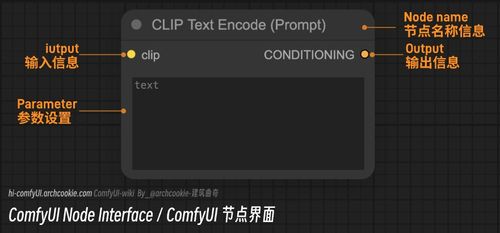
Key strengths
- Granular control
- Shareable workflows
- Native batching
Traditional SEO Tool Interfaces
Traditional interfaces are dashboard-first tools like Semrush, Ahrefs, Screaming Frog, plus automation layers like n8n and Make. They fit teams that want faster onboarding, native connectors, and standard reports, with n8n commonly used to connect GSC, GA4, Ahrefs, and Screaming Frog in SEO workflows.
Learning Curve: Dashboard Familiarity vs Node-Graph Fluency
Traditional SEO dashboards win on day one. Most teams already know menus, filters, and export flows. ComfyUI asks you to think in nodes, links, and execution order. That is a real tax at first. Wikipedia notes that ComfyUI is a node-based workflow system, and even mainstream guides call its learning curve steeper than form-style interfaces.
The trade-off is simple:
- Dashboards are faster to learn
- Node graphs are faster to adapt once your workflow gets messy
If your SEO team changes process every week, the harder start can pay back fast.
Also Read: 10 Best AI Content Marketing Tools to Scale Your Strategy in 2026
Workflow Repeatability: Templates vs Reports
Repeatable SEO work needs templates, not just reports. Reports show what happened. Templates define what should happen next, the same way, every time. NIST notes that reproducible workflows depend on documented procedures and structured reporting, not ad hoc summaries alone NIST traceability guidance.
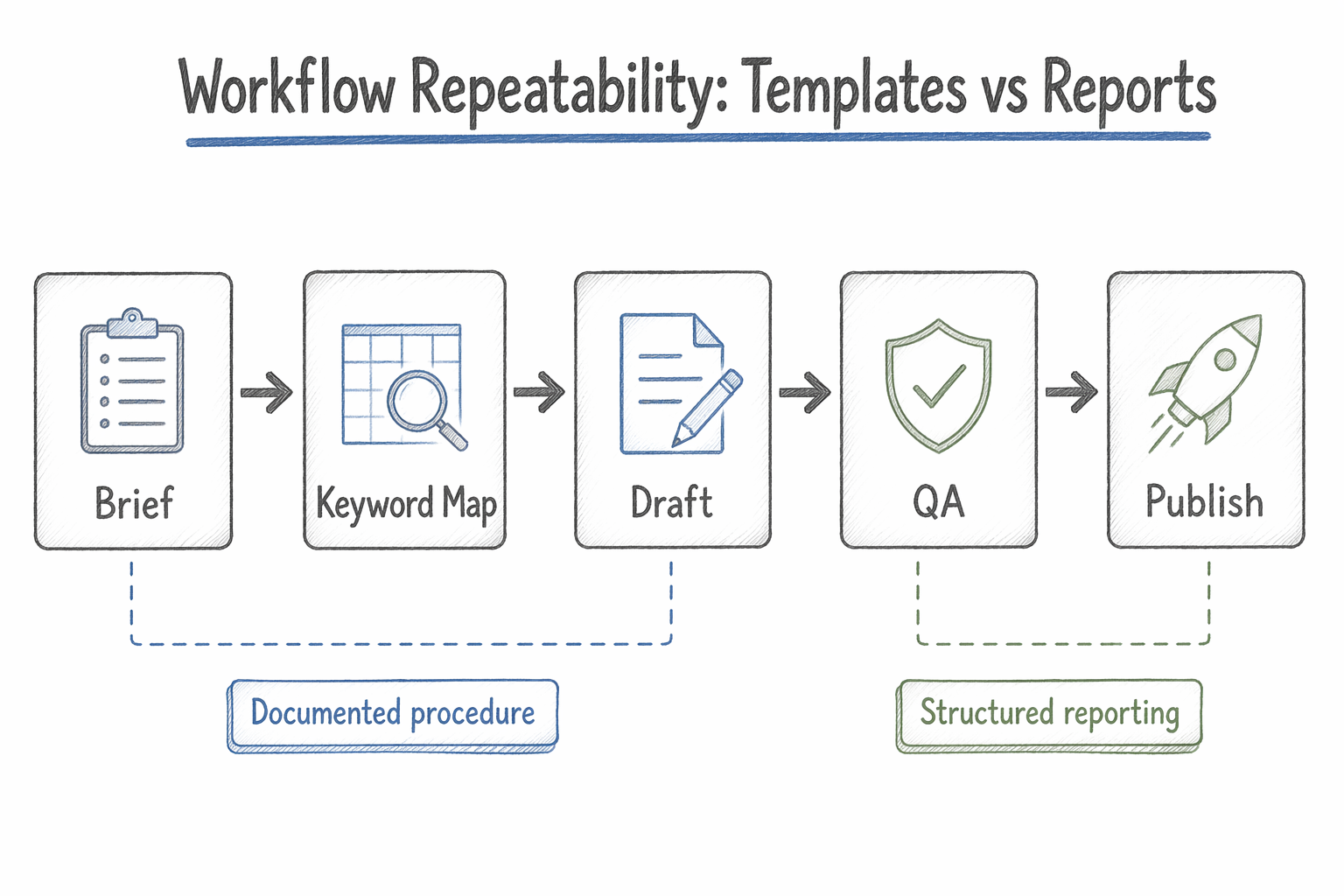
- Traditional interfaces are strong at dashboards, exports, and snapshots.
- ComfyUI-style workflows are stronger when you need reusable prompt chains, fixed inputs, and versioned output paths.
If two analysts can run the same workflow and get comparable outputs, your process is mature.
NIST also ties workflow quality to repeatability and reproducibility in digital systems NIST LIMS roadmap.
Also Read: Best SEO Tools: 25 Picks to Improve Rankings in 2026
Batch Processing at Scale: Ops Pricing vs Free Throughput
Free throughput wins when jobs are small, delayed, and easy to rerun. Paid ops wins once missed deadlines cost more than compute. Batch processing is built for unattended, high-volume work per Wikipedia, but scale changes the math fast.

Google Cloud also notes Batch itself has no extra fee, but you still pay for the VMs, disks, GPUs, and network around it in its pricing doc.
If your SEO team runs overnight renders, image sets, or prompt batches daily, price the full pipeline, not just the interface.
Which Should You Choose: ComfyUI or Traditional Interfaces for SEO Workflows?
Choose traditional interfaces if your team needs speed, easy training, and clean handoffs. They fit keyword research, audits, briefs, and repeat reporting. Choose ComfyUI if you need custom workflow logic, reusable node chains, and deeper control over multi-step AI content ops. ComfyUI is a node-based system built for visible, modular workflows, according to Wikipedia’s overview of ComfyUI.
A simple rule:
- Pick traditional UI for day-to-day SEO execution.
- Pick ComfyUI for production pipelines and edge-case automation.
- Use both if your SEO team tests in UI tools, then scales winners in graph workflows.
Most SEO teams should not replace traditional tools. They should add ComfyUI where workflow complexity starts to hurt speed.
Pick the workflow that fits your team, then streamline audits, content, and AI visibility in SnowSEO.
Frequently Asked Questions
Q1: How does Comfy UI compare to traditional interfaces for SEO workflows?
Comfy UI gives you flexible, node-based automation for repeatable SEO tasks. Traditional interfaces are faster for audits, reports, and daily use. Most teams should use Comfy UI as a production layer, not a full replacement.
Q2: What are the benefits of using Comfy UI for content creation?
It helps you chain prompts, enrich inputs, reuse logic, and control outputs at scale. That matters when you need consistent briefs, entity coverage, image steps, or multi-stage content pipelines with fewer manual clicks.
Q3: Is Comfy UI easier to learn than traditional SEO tools?
No, not at first. Traditional SEO tools are easier for most teams because the interface guides you. Comfy UI has a steeper setup curve, but it pays off when your workflow needs custom branching and automation.
Conclusion
ComfyUI works best as a flexible workflow layer, while traditional GUIs stay better for fast, simple tasks. Workflow design and node graph architecture explain why both fit different SEO jobs.
Leave a Reply